- OSB Smart Dashboards
- Monitoring ProxyService Performance
- Monitoring Deployed OSB Services Trend
- Summarizing OSB Service List & Endpoint URIs
"
},
{
"type": 10,
"thumbnailImage": "/assets/img/media/wallpaper/thubnails/readMeThumbnail.png",
"thumbnailAltText": "WLSDM ReadMe v2.4.0",
"link": "https://wlsdm.com/docs/v2.4.0/README",
"linkTitle": "ReadMe v2.4.0",
"header": "ReadMe v2.4.0",
"description": "v2.4.0:
- Enable Backend HEALTH Cache feature is added to Health Dashboard. Enable this feature for the domains which have too many resources or heavy page loads. WLSDM applies to backend HEALTH cache data for better performance
- Email notification recipients property is enriched. It is possible to send separate HEALTH and METRIC email notifications. Supports L1 and L2 operation teams
- Email addresses are collected as default email list. (Customer request)
"
}
]
}
]
},
{
"type": 1,
"header": "Tutorials",
"items": [
{
"type": 2,
"header": "Youtube Video Tutorials",
"items": [
{
"type": 12,
"thumbnailImage": "/assets/img/INSTALLATION-AND-INTRODUCTION-TUTORIAL.png",
"thumbnailAltText": "Installation and Console Usage: Oracle JCS (Java Cloud Service) or On-Premise",
"link": "https://youtu.be/6R7FsDwmn7c",
"linkTitle": "Installation and Console Usage: Oracle JCS (Java Cloud Service) or On-Premise",
"header": "Installation and Console Usage: Oracle JCS (Java Cloud Service) or On-Premise (Newest)",
"description": "Q: How to install WLSDM on WebLogic 11g/12c, On-Premise, Oracle Java Cloud Service (JCS)?
A: Step-by-Step WLSDM Installation; watch this tutorial and learn quickly how to install WLSDM for WebLogic! Whether cloud or on-premise..."
},
{
"type": 12,
"thumbnailImage": "/assets/img/INSTALLATION-AND-INTRODUCTION-TUTORIAL.png",
"thumbnailAltText": "How to install WLSDM on WebLogic 11g/12c?",
"link": "https://www.youtube.com/embed/a998IUcq4NY?rel=1",
"linkTitle": "How to install WLSDM on WebLogic 11g/12c?",
"header": "WLSDM Installation and Introduction Tutorial (Old Version)",
"description": "Q: How to install WLSDM on WebLogic 11g/12c?
A: Step-by-Step WLSDM Installation; watch this tutorial and learn quickly how to install WLSDM for WebLogic!"
},
{
"type": 12,
"thumbnailImage": "/assets/img/JVM-SYSTEM-RESOURCES-DASHBOARD-TUTORIAL.png",
"thumbnailAltText": "WLSDM JVM System Resources Dashboard Tutorial",
"link": "https://www.youtube.com/embed/_bJeg4z-Cag?rel=1",
"linkTitle": "WLSDM JVM System Resources Dashboard Tutorial",
"header": "WLSDM JVM System Resources Dashboard Tutorial",
"description": "Q: How to monitor WebLogic Managed Server, Admin Server JVM instances?
A:Go to \"Smart Dashboards > JVM System Resource\" page. You can monitor below WebLogic metrics easily on WLSDM.- Server/JVM CPU Load
- Heap Usage
- Heap Size
- Heap Free Size
- Garbage Collection Durations
"
},
{
"type": 12,
"thumbnailImage": "/assets/img/WLSDM-SOA-SUITE-TUTORIAL.PNG",
"thumbnailAltText": "WLSDM SOA Suite Tutorial",
"link": "https://youtu.be/JwSgIkZB4og",
"linkTitle": "WLSDM SOA Suite Tutorial",
"header": "WLSDM SOA Suite Tutorial",
"description": "WLSDM SOA Suite domain monitoring and management features:
- SOA Smart Dashboards
- SOA Notifications and Alarms
- SOA Reports
- SOA Daily Reports (EMAIL)
"
},
{
"type": 12,
"thumbnailImage": "/assets/img/WLSDM-OSB-MODULE-TUTORIAL.PNG",
"thumbnailAltText": "WLSDM OSB Module Tutorial",
"link": "https://youtu.be/8XYUuvd_RQc",
"linkTitle": "WLSDM OSB Module Tutorial",
"header": "WLSDM OSB Module Tutorial",
"description": "WLSDM Oracle Service Bus (OSB) domain monitoring features:
- OSB Smart Dashboards
- OSB Notifications and Alarms
- OSB Reports
- OSB Daily Reports (EMAIL)
"
},
{
"type": 12,
"thumbnailImage": "/assets/img/DASHBOARD-USAGE-TUTORIAL.png",
"thumbnailAltText": "WLSDM Dashboard Usage Tutorial",
"link": "https://www.youtube.com/embed/a9pwg-5emCE?rel=1",
"linkTitle": "WLSDM Dashboard Usage Tutorial",
"header": "WLSDM Dashboard Usage Tutorial",
"description": "Q: How to monitor WebLogic Managed Server(s), Data Sources, Deployments, JMS Servers?
A: WLSDM has below inbox smart dashboards with ALERT/CLEAR alarm setups: - WebLogic Managed Server(s)
- Data Sources
- Deployments
- JMS Server(s)
- Garbage Collection
"
},
{
"type": 12,
"thumbnailImage": "/assets/img/ACTIONS-TUTORIAL-HEAP-DUMP-THREAD-DUMP-JFR-DIAGNOSTIC-IMAGE.png",
"thumbnailAltText": "WLSDM Alert Actions Tutorial",
"link": "https://www.youtube.com/embed/ec-MccMPCqY?rel=1",
"linkTitle": "WLSDM Alert Actions Tutorial",
"header": "WLSDM Alert Actions Tutorial",
"description": "Q: How to create custom WebLogic automation action(s) on WebLogic?
A: WLSDM has five inbox actions as below and has a well designed infrastructure to create user-defined custom actions: - Thread Dump
- Java Fligh Recorder (JFR)
- CPU Sample
- Heap Dump
- WLDF Image
"
},
{
"type": 12,
"thumbnailImage": "/assets/img/MONITOR_APPLICATIONS_DATABASE_STATEMENTS_AND_PERFORMANCE.png",
"thumbnailAltText": "WLSDM: How to monitor applications' database statements (JDBC SQL) and performance on Oracle WebLogic Server?",
"link": "https://youtu.be/8jnui0oNwHw",
"linkTitle": "WLSDM: How to monitor applications' database statements (JDBC SQL) and performance on Oracle WebLogic Server?",
"header": "WLSDM: How to monitor applications' database statements (JDBC SQL) and performance on Oracle WebLogic Server?",
"description": "If your application has slow JDBC execute statements then these statements need to be tuned by DBA or developer. A WebLogic administrator has to be report these slow JDBC SQL statements continuously. Because, in production environments deployments never stops. In this case, WLSDM able to monitor JDBC SQL statements continuously and notifies you when slow SQL statements occurs. Receive fancy HTML alert emails covering all the problematic SQL statements as an attachment for the given back-end threshold.
Let's make some practice and learn how WLSDM back-end system monitoring helps you to facilitate monitoring Database JDBC SQL Statement on WebLogic Server..."
},
{
"type": 12,
"thumbnailImage": "/assets/img/METRIC-BROWSER-AND-EMAIL-USAGE-TUTORIAL.png",
"thumbnailAltText": "WLSDM Metric Browser and Email Usage Tutorial",
"link": "https://www.youtube.com/embed/7O857Ar7b28?rel=1",
"linkTitle": "WLSDM Metric Browser and Email Usage Tutorial",
"header": "WLSDM Metric Browser and Email Usage Tutorial",
"description": "Q: How to see and list WebLogic JMX MBeans on WLSDM?
Q: How to configure SMTP on WLSDM for monitoring WebLogic?
A: WLSDM has dynamic JMX MBean Browser page and able to list all JMX Mbeans. Also it is possible to search MBeans on \"MBean Search\" Page.
A: Configure SMTP settings then notify instantly for WebLogic alerts and critical issues..."
},
{
"type": 12,
"thumbnailImage": "/assets/img/RESPONSE-TIMES-AND-LOG-INSPECTOR-TUTORIAL.png",
"thumbnailAltText": "WLSDM Response Times and Log Inspector Tutorial",
"link": "https://www.youtube.com/embed/t33ZvlNArZI?rel=1",
"linkTitle": "WLSDM Response Times and Log Inspector Tutorial",
"header": "WLSDM Response Times and Log Inspector Tutorial",
"description": "Q: How to monitor application response times on WebLogic?
Q: How to monitor Oracle WebLogic server logs (server, stoud, sterr, diagnostic, out... etc. any kind) on WebLogic WLSDM?
WLSDM has inbox WebLogic log monitoring to capture: - OutOfMemory
- Unchecked Exceptions
- DeadLock
- Heap Space
- Stuck Thread
- General Severity Error...
It is possible to monitory every kind of text file on server via WLSDM"
},
{
"type": 12,
"thumbnailImage": "/assets/img/WebLogic-JMX-MBean-Metric-Monitoring-Tutorial-and-WLSDM-MBean-Dashboards.png",
"thumbnailAltText": "WebLogic JMX MBean Metric Monitoring Tutorial and WLSDM MBean Dashboards",
"link": "https://www.youtube.com/embed/zOuNQ-sL4n8?list=PLNO-SvTy6cAQz5zV-WwdNeytqomkmHAkl",
"linkTitle": "WebLogic JMX MBean Metric Monitoring Tutorial and WLSDM MBean Dashboards",
"header": "WebLogic JMX MBean Metric Monitoring Tutorial and WLSDM MBean Dashboards",
"description": "Q: How to monitor Open Sockets (OpenSocketsCurrentCount) on WebLogic?
A: WLSDM has lots of inbox JMX MBean metric offers to monitor. Administrators increase WebLogic domain management by using WLSDM.
Watch this tutorial and understand WebLogic JMX MBean secrets..."
},
{
"type": 12,
"thumbnailImage": "/assets/img/Health-Monitoring-and-Health-Dashboard.png",
"thumbnailAltText": "Health Monitoring and Health Dashboard",
"link": "https://youtu.be/PeKJusLuarI?list=PLNO-SvTy6cAQz5zV-WwdNeytqomkmHAkl",
"linkTitle": "Health Monitoring and Health Dashboard",
"header": "Health Monitoring and Health Dashboard",
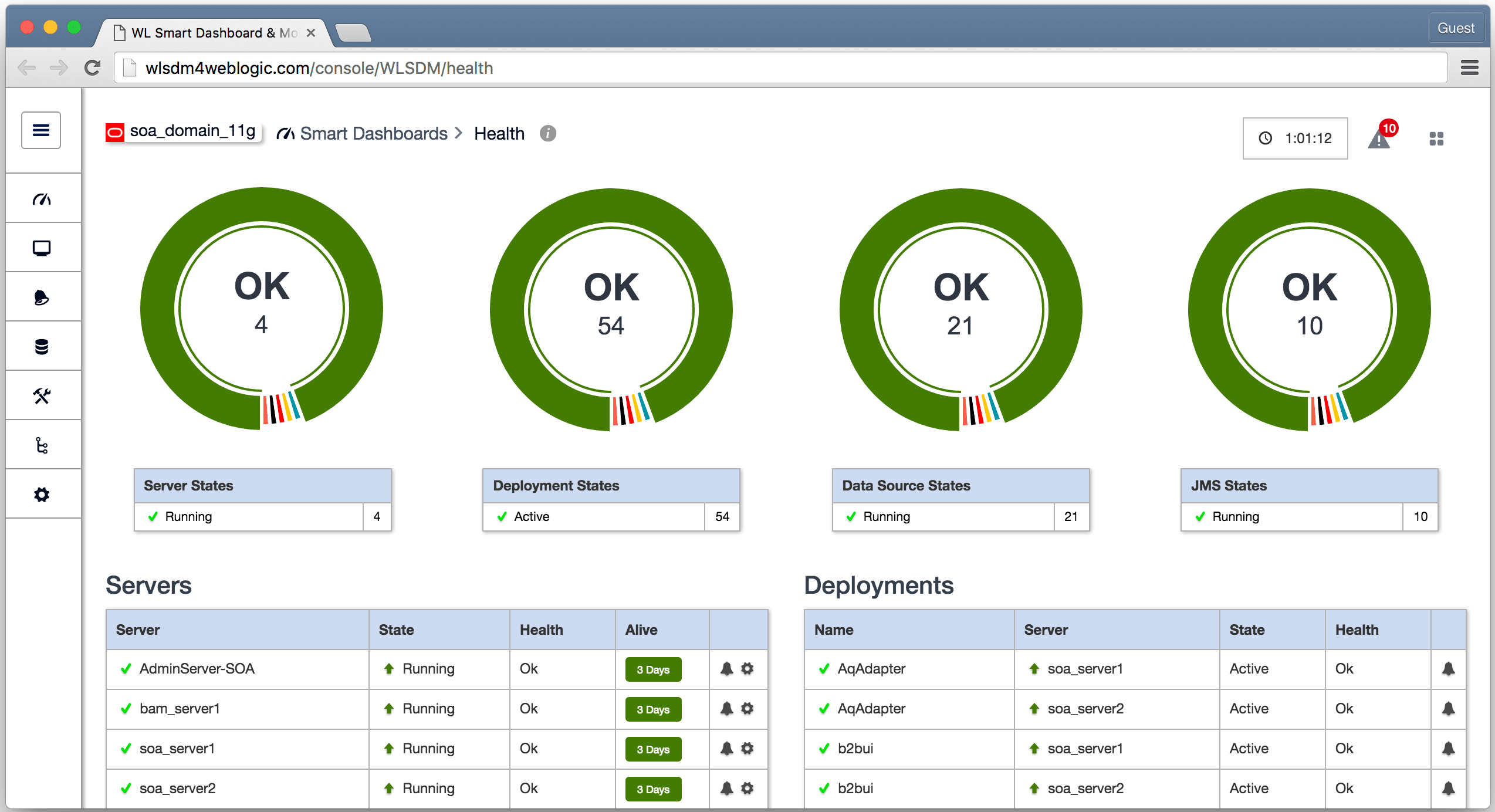
"description": "Q: How to monitor Oracle WebLogic Server health and states?
A: WLSDM has health dashboard and you are able to monitor every detail about WebLogic health details:- WebLogic Server Health
- WebLogic Server States
- Health/State ALERT and CLEAR emails
- Data Source Health/State
- Deployments Health/State
- JMS Server Health/States
"
},
{
"type": 12,
"thumbnailImage": "/assets/img/howtos/how_to_export_import_wlsdm_settings.png",
"thumbnailAltText": "How to export/import WLSDM settings, definitions and configurations for multiple WLSDM installation as a standard setup?",
"link": "https://youtu.be/N498P5cDi2M",
"linkTitle": "How to export/import WLSDM settings, definitions and configurations for multiple WLSDM installation as a standard setup?",
"header": "How to export/import WLSDM settings, definitions and configurations for multiple WLSDM installation as a standard setup?",
"description": "- Go to \"WLSDM System Settings\" page
- Open \"Page Operations\" menu then click \"Export WLSDM Configuration\" button
- Switch to new WLSDM installation in different/antoher WebLogic domain
- In the begining of \"WLSDM Wizard\" click \"Import WLSDM Config\" button then upload the exported file
"
},
{
"type": 12,
"thumbnailImage": "/assets/img/howtos/how_to_add_jmx_mbean_objects_to_dashboards.png",
"thumbnailAltText": "How to add JMX MBean objects (metrics) to dashboards via WLSDM MBean Browser?",
"link": "https://youtu.be/MnmPAUKIgtE",
"linkTitle": "How to add JMX MBean objects (metrics) to dashboards via WLSDM MBean Browser?",
"header": "How to add JMX MBean objects (metrics) to dashboards via WLSDM MBean Browser?",
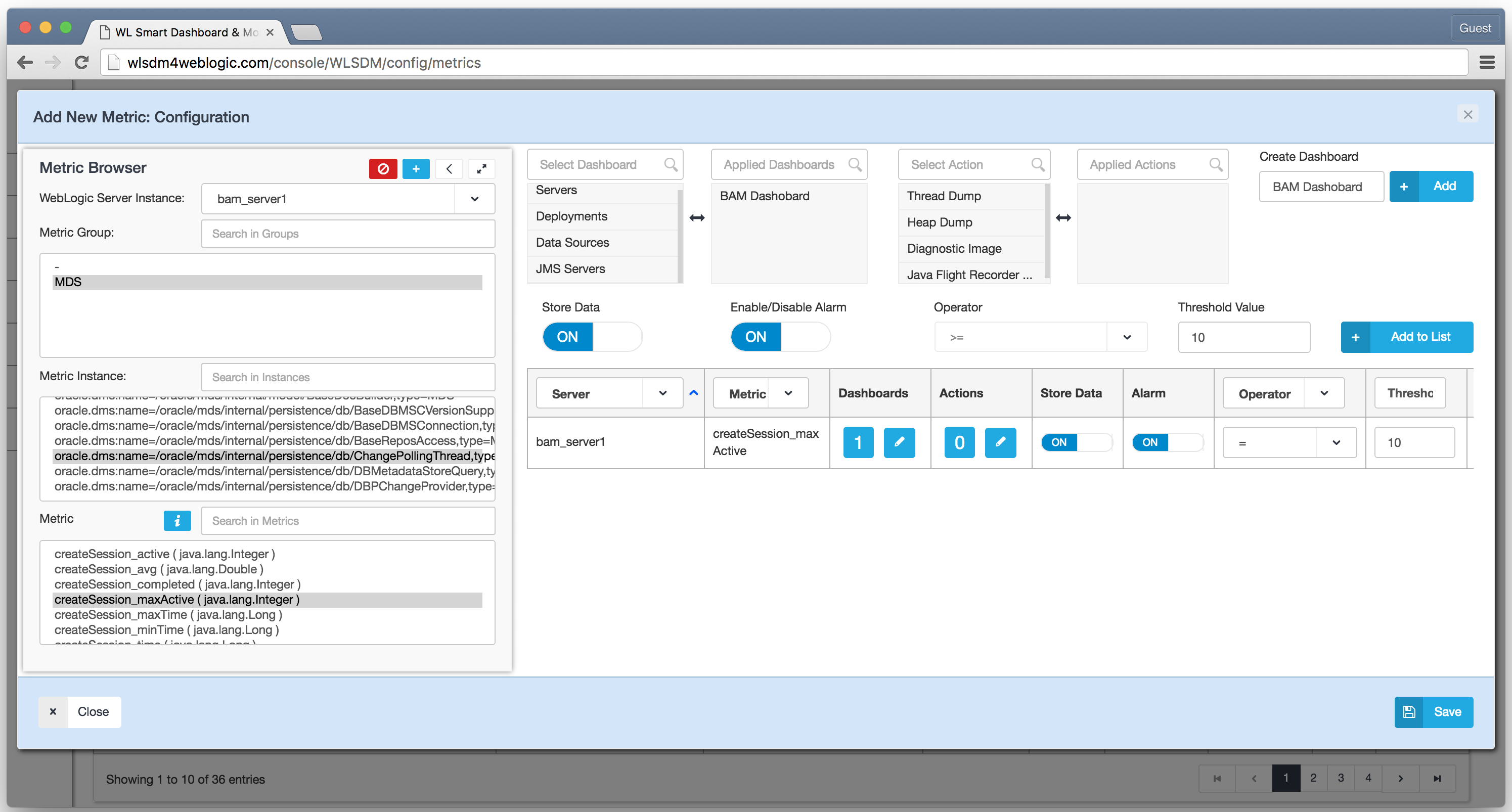
"description": "- Go to \"Metric Settings & JMX Browser\" page
- Click \"Add New JMX MBean Metrics\" from page operations menu
- Search metric then select \"Server, Metric Group and Metric\" from the MBean Browser
- Configure metric options then click \"Add To List\" button to \"Save\"
- Newly added metric is going to be available in the assigned smart dashboard(s)
"
},
{
"type": 12,
"thumbnailImage": "/assets/img/howtos/smart_dashboards_display_settings.png",
"thumbnailAltText": "Smart Dashboards Display Settings",
"link": "https://youtu.be/GEyRPwjwZVM",
"linkTitle": "Smart Dashboards Display Settings",
"header": "Smart Dashboards Display Settings",
"description": "- Go to \"Smart Dashboards\" pages (i.e.Smart Dashboards > Servers)
- Configure smart dashboards display settings by using \"Page Operations\" menu
Q: How to reorder metric charts?
A: Click \"Reorder Metric Chart Positions\" button to open \"Reorder Metrics\" modal window Drag and drop metrics and rearrange orders in \"Reorder Metrics\" modal window"
},
{
"type": 12,
"thumbnailImage": "/assets/img/howtos/how_to_change_back_end_monitoring_alarm_thresholds.png",
"thumbnailAltText": "How to change \"Back-end Monitoring\" alarm thresholds?",
"link": "https://youtu.be/3NTNTzJwwFY",
"linkTitle": "How to change \"Back-end Monitoring\" alarm thresholds?",
"header": "How to change \"Back-end Monitoring\" alarm thresholds?",
"description": "- Go to \"Monitoring & Diagnostic Page\"
- Go to \"Back - end Systems\" tab and click \"Edit button\"
- Edit alarm thresholds in \"Modal Window\"
"
},
{
"type": 12,
"thumbnailImage": "/assets/img/howtos/how_to_create_custom_log_monitoring_in_log_inspector.png",
"thumbnailAltText": "How to create \"Custom Log Monitoring\" in LogInspector?",
"link": "https://youtu.be/xGU-rtWz9f0",
"linkTitle": "How to create \"Custom Log Monitoring\" in LogInspector?",
"header": "How to create \"Custom Log Monitoring\" in LogInspector?",
"description": "- Go to \"Monitoring & Diagnostics\" page
- Click \"Add New Log Monitoring\" from page operations menu
- Set \"Log Inspector Monitoring Name\" then choose \"Log Type\" as \"Create New\"
- Add \"Search String\"
- Select server(s) to monitor log files
- Configure tail line count and delivery settings
- Save newly added \"Log Monitoring\" definition
"
},
{
"type": 12,
"thumbnailImage": "/assets/img/howtos/how_to_create_user_defined_actions_scripts.png",
"thumbnailAltText": "How to create \"User-Defined Actions / Scripts\"?",
"link": "https://youtu.be/_II71EnQrGQ",
"linkTitle": "How to create \"User-Defined Actions / Scripts\"?",
"header": "How to create \"User-Defined Actions / Scripts\"?",
"description": "- Go to \"Monitoring & Diagnostic\" page
- Open \"Page Operations\" menu then click \"New User-Defined Actions / Script\" button
- Set name and executable target file path then click \"Save\"
- Go to Smart Dashboards (i.e.Servers) and open \"Metric & Chart Options\" window for the relevant MBean (i.e.StuckThreadCount)
- Click on \"Actions - Control Field\" button and open \"Actions\" modal window
- Select newly added \"User-Defined Action\" (i.e.RestartManagedServer) and move to the right \"Applied Actions\" box
- Save action.If the metric value exceeds the threshold new actions will be fired/executed asynchronous by WLSDM
"
},
{
"type": 12,
"thumbnailImage": "/assets/img/howtos/how_to_delete_files_with_user_defined_scheduler_job.png",
"thumbnailAltText": "How to Delete Files With User-Defined Scheduler Job?",
"link": "https://youtu.be/WJMsc3JdTRk",
"linkTitle": "How to Delete Files With User-Defined Scheduler Job?",
"header": "How to Delete Files With User-Defined Scheduler Job?",
"description": "- Go to \"Monitoring and Diagnostic\" page
- Define script (i.e. deletefiles.bat) and add file path to \"User-Defined Actions / Script\"
- Click \"New scheduled Job / Downtime\" button from page operations menu
- Select \"User-Defined Actions / Script\" and configure scheduler job settings
- Script will be activated when cron time is valid
"
}
]
},
{
"type": 2,
"header": "Quick Screen Casts (GIF)",
"items": [
{
"type": 10,
"thumbnailImage": "/assets/img/media/wallpaper/thubnails/ScreencastThumbnail.png",
"thumbnailAltText": "How to get auto JVM HEAP dump and CPU sample in WebLogic?",
"link": "/docs/screencasts/Profilings_Dumps_HEAP_and_CPU_JVisualVM.gif",
"linkTitle": "How to get auto JVM HEAP dump and CPU sample in WebLogic?",
"header": "How to get auto JVM HEAP dump and CPU sample in WebLogic?",
"description": "- Use HeapFreePercentage MBean metric and enable 'Heap Dump' auto action and generate.HPROF file.
- Use #ProcessCPULoad MBean metric and enable 'CPU Sample' auto action and generate.NPSS file.
Use inbox JDK tool #JVisualVM to open these file.
Watch this short video for your reference."
},
{
"type": 10,
"thumbnailImage": "/assets/img/media/wallpaper/thubnails/ScreencastThumbnail.png",
"thumbnailAltText": "WebLogic SQL Monitoring With WLSDM Generic DevOps MBean",
"link": "/docs/screencasts/weblogic_sql_monitoring_wlsdm_generic_devops_mbean.gif",
"linkTitle": "WebLogic SQL Monitoring With WLSDM Generic DevOps MBean",
"header": "WebLogic SQL Monitoring With WLSDM Generic DevOps MBean",
"description": "How to WebLogic SQL Monitoring With WLSDM Generic DevOps MBean?"
},
{
"type": 10,
"thumbnailImage": "/assets/img/media/wallpaper/thubnails/ScreencastThumbnail.png",
"thumbnailAltText": "WebLogic Monitoring: WLSDM Generic DevOps MBean and Custom Actions",
"link": "/docs/screencasts/WebLogic_Monitoring_WLSDM_Generic_DevOps_MBean_and_Custom_Actions.gif",
"linkTitle": "WebLogic Monitoring: WLSDM Generic DevOps MBean and Custom Actions",
"header": "WebLogic Monitoring: WLSDM Generic DevOps MBean and Custom Actions",
"description": "WebLogic Monitoring: WLSDM Generic DevOps MBean and Custom Actions"
},
{
"type": 10,
"thumbnailImage": "/assets/img/media/wallpaper/thubnails/ScreencastThumbnail.png",
"thumbnailAltText": "WebLogic Log Monitoring With WLSDM Custom Log Monitoring",
"link": "/docs/screencasts/weblogic_log_monitoring_wlsdm_email.gif",
"linkTitle": "WebLogic Log Monitoring With WLSDM Custom Log Monitoring",
"header": "WebLogic Log Monitoring With WLSDM Custom Log Monitoring",
"description": "WebLogic Log Monitoring With WLSDM Custom Log Monitoring"
},
{
"type": 10,
"thumbnailImage": "/assets/img/media/wallpaper/thubnails/ScreencastThumbnail.png",
"thumbnailAltText": "WLSDM - WebLogic Profiling Dumps - Get Thread Dump, Analyze Thread Dump and Share",
"link": "/docs/screencasts/ThreadDumpAnalyzer.gif",
"linkTitle": "WLSDM - WebLogic Profiling Dumps - Get Thread Dump, Analyze Thread Dump and Share",
"header": "WLSDM - WebLogic Profiling Dumps - Get Thread Dump, Analyze Thread Dump and Share",
"description": "WLSDM - WebLogic Profiling Dumps - Get Thread Dump, Analyze Thread Dump and Share"
},
{
"type": 10,
"thumbnailImage": "/assets/img/media/wallpaper/thubnails/ScreencastThumbnail.png",
"thumbnailAltText": "Adding company signature and logo to WLSDM HTML Mail Templates",
"link": "/docs/screencasts/mail_sign_video.gif",
"linkTitle": "Adding company signature and logo to WLSDM HTML Mail Templates",
"header": "Adding company signature and logo to WLSDM HTML Mail Templates",
"description": "Adding company signature and logo to WLSDM HTML Mail Templates"
},
{
"type": 10,
"thumbnailImage": "/assets/img/media/wallpaper/thubnails/ScreencastThumbnail.png",
"thumbnailAltText": "WLSDM User-Defined Monitoing Actions - Suspending Managed Server",
"link": "/docs/screencasts/Actions.to.Suspend.gif",
"linkTitle": "WLSDM User-Defined Monitoing Actions - Suspending Managed Server",
"header": "WLSDM User-Defined Monitoing Actions - Suspending Managed Server",
"description": "WLSDM User-Defined Monitoing Actions - Suspending Managed Server"
}
]
},
{
"type": 2,
"header": "Blog Tutorials",
"items": [
{
"type": 10,
"thumbnailImage": "/assets/img/ADVANCED-WEBLOGIC-MONITORING-AND-AUTOMATION-DEVELOP-JMX-MBEANS.png",
"thumbnailAltText": "Advanced WebLogic Monitoring and Automation: Develop JMX MBeans",
"link": "/tutorials/advanced-weblogic-monitoring-develop-jmx-mbeans-and-automate-with-wlsdm-metric-actions",
"linkTitle": "Advanced WebLogic Monitoring and Automation: Develop JMX MBeans",
"header": "Advanced WebLogic Monitoring and Automation: Develop JMX MBeans",
"description": "Advanced WebLogic Monitoring and Automation: Develop JMX MBeans"
},
{
"type": 10,
"thumbnailImage": "/assets/img/HOW-TO-GET-WEBLOGIC-THREAD-DUMP-CONTINUOUSLY.png",
"thumbnailAltText": "How to get WebLogic thread dump continuously?",
"link": "/tutorials/how-to-retrieve-the-current-stack-information-from-a-weblogic-server-continuously",
"linkTitle": "How to get WebLogic thread dump continuously?",
"header": "How to get WebLogic thread dump continuously?",
"description": "How to get WebLogic thread dump continuously?"
},
{
"type": 10,
"thumbnailImage": "/assets/img/WLSDM_Usecase_Monitoring_IFS_IFSWORLD.png",
"thumbnailAltText": "WLSDM Usecase: Monitoring IFS / IFSWORLD",
"link": "/tutorials/usecase-monitoring-ifs-ifsworld-erp-with-wlsdm",
"linkTitle": "WLSDM Usecase: Monitoring IFS / IFSWORLD",
"header": "WLSDM Usecase: Monitoring IFS / IFSWORLD",
"description": "WLSDM Usecase: Monitoring IFS / IFSWORLD"
}
]
}
]
},
{
"type": 1,
"header": "Posts",
"items": [
{
"type": 2,
"header": "Community Posts",
"items": [
{
"type": 10,
"thumbnailImage": "/assets/img/media/wallpaper/thubnails/community.png",
"thumbnailAltText": "Monitor Oracle Database ACTIVE/INACTIVE Sessions on WebLogic WLSDM Console + Plus JSL (Java Server Loader)",
"link": "https://community.wlsdm.com/topic/51/monitor-oracle-database-active-inactive-sessions-on-weblogic-wlsdm-console-plus-jsl-java-server-loader",
"linkTitle": "Monitor Oracle Database ACTIVE/INACTIVE Sessions on WebLogic WLSDM Console + Plus JSL (Java Server Loader)",
"header": "Monitor Oracle Database ACTIVE/INACTIVE Sessions",
"description": "Monitor Oracle Database ACTIVE/INACTIVE Sessions on WebLogic WLSDM Console + Plus JSL (Java Server Loader)"
},
{
"type": 10,
"thumbnailImage": "/assets/img/media/wallpaper/thubnails/community.png",
"thumbnailAltText": "Monitor Database and Calculate DB Response Time on WebLogic",
"link": "https://community.wlsdm.com/topic/37/monitor-database-and-calculate-db-response-time-on-weblogic",
"linkTitle": "Monitor Database and Calculate DB Response Time on WebLogic",
"header": "Monitor Database and Calculate DB Response Time on WebLogic",
"description": "Monitor Database and Calculate DB Response Time on WebLogic"
},
{
"type": 10,
"thumbnailImage": "/assets/img/media/wallpaper/thubnails/community.png",
"thumbnailAltText": "Monitor WebService Response Times with curl (-alldetails) on WebLogic",
"link": "https://community.wlsdm.com/topic/38/monitor-webservice-response-times-with-curl-alldetails-on-weblogic",
"linkTitle": "Monitor WebService Response Times with curl (-alldetails) on WebLogic",
"header": "Monitor WebService Response Times with CURL",
"description": "Monitor WebService Response Times with curl (-alldetails) on WebLogic"
}
]
},
{
"type": 2,
"header": "Medium Posts",
"items": [
{
"type": 10,
"thumbnailImage": "/assets/img/media/wallpaper/thubnails/wlsdm-medium.png",
"thumbnailAltText": "WLSDM Generic DevOps MBean Tutorials Index",
"link": "https://medium.com/wlsdmforweblogic/wlsdm-generic-devops-mbean-index/home",
"linkTitle": "WLSDM Generic DevOps MBean Tutorials Index",
"header": "WLSDM Generic DevOps MBean Tutorials Index",
"description": "WLSDM Generic DevOps MBean Tutorials Index"
},
{
"type": 10,
"thumbnailImage": "/assets/img/media/wallpaper/thubnails/wlsdm-medium.png",
"thumbnailAltText": "How to monitor OracleDB ACTIVE/INACTIVE Sessions on WebLogic?",
"link": "https://medium.com/wlsdmforweblogic/how-to-monitor-oracledb-active-inactive-sessions-on-weblogic-26f67a1eed2d",
"linkTitle": "How to monitor OracleDB ACTIVE/INACTIVE Sessions on WebLogic?",
"header": "How to monitor OracleDB ACTIVE/INACTIVE Sessions on WebLogic?",
"description": "How to monitor OracleDB ACTIVE/INACTIVE Sessions on WebLogic?"
},
{
"type": 10,
"thumbnailImage": "/assets/img/media/wallpaper/thubnails/wlsdm-medium.png",
"thumbnailAltText": "Log Monitoring Screencast: Monitor Every Text File On WebLogic",
"link": "https://medium.com/wlsdmforweblogic/log-monitoring-screencast-monitor-every-text-file-on-weblogic-b7aac675d4dc",
"linkTitle": "Log Monitoring Screencast: Monitor Every Text File On WebLogic",
"header": "Log Monitoring Screencast: Monitor Every Text File On WebLogic",
"description": "Log Monitoring Screencast: Monitor Every Text File On WebLogic"
},
{
"type": 10,
"thumbnailImage": "/assets/img/media/wallpaper/thubnails/wlsdm-medium.png",
"thumbnailAltText": "Generic DevOps MBean Screencast: SQL MBean Transformation on WebLogic",
"link": "https://medium.com/wlsdmforweblogic/generic-devops-mbean-screencast-sql-mbean-transformation-on-weblogic-301f872e4378",
"linkTitle": "Generic DevOps MBean Screencast: SQL MBean Transformation on WebLogic",
"header": "Generic DevOps MBean Screencast: SQL MBean Transformation on WebLogic",
"description": "Generic DevOps MBean Screencast: SQL MBean Transformation on WebLogic"
},
{
"type": 10,
"thumbnailImage": "/assets/img/media/wallpaper/thubnails/wlsdm-medium.png",
"thumbnailAltText": "WLSDM v3.1 is now available. MBean, MBean, MBean.... WebLogic DevOps MBean!",
"link": "https://medium.com/wlsdmforweblogic/wlsdm-v3-1-is-now-available-mbean-mbean-mbean-weblogic-devops-mbean-904c8f61c489",
"linkTitle": "WLSDM v3.1 is now available. MBean, MBean, MBean.... WebLogic DevOps MBean!",
"header": "WLSDM v3.1 is now available. MBean, MBean, MBean.... WebLogic DevOps MBean!",
"description": "WLSDM v3.1 is now available. MBean, MBean, MBean.... WebLogic DevOps MBean!"
},
{
"type": 10,
"thumbnailImage": "/assets/img/media/wallpaper/thubnails/wlsdm-medium.png",
"thumbnailAltText": "About WLSDM for WebLogic Product and New Updates (WLSDM, wlsdm.com, Blog Portal, Support System...)",
"link": "https://medium.com/wlsdmforweblogic/about-wlsdm-for-weblogic-product-and-new-updates-wlsdm-wlsdm-com-blog-portal-support-system-b6ac0043853d",
"linkTitle": "About WLSDM for WebLogic Product and New Updates (WLSDM, wlsdm.com, Blog Portal, Support System...)",
"header": "About WLSDM for WebLogic Product and New Updates (WLSDM, wlsdm.com, Blog Portal, Support System...)",
"description": "About WLSDM for WebLogic Product and New Updates (WLSDM, wlsdm.com, Blog Portal, Support System...)"
},
{
"type": 10,
"thumbnailImage": "/assets/img/media/wallpaper/thubnails/wlsdm-medium.png",
"thumbnailAltText": "New Video Tutorial: How to monitor WebLogic ManagedServer JVM Resources?",
"link": "https://medium.com/wlsdmforweblogic/new-video-tutorial-how-to-monitor-weblogic-managedserver-jvm-resources-cab90af65ff6",
"linkTitle": "New Video Tutorial: How to monitor WebLogic ManagedServer JVM Resources?",
"header": "New Video Tutorial: How to monitor WebLogic ManagedServer JVM Resources?",
"description": "New Video Tutorial: How to monitor WebLogic ManagedServer JVM Resources?"
},
{
"type": 10,
"thumbnailImage": "/assets/img/media/wallpaper/thubnails/wlsdm-medium.png",
"thumbnailAltText": "A quick review and brilliant blog post by Oracle ACE Dirk Nachbar",
"link": "https://medium.com/wlsdmforweblogic/a-quick-review-and-brilliant-blog-post-by-oracle-ace-dirk-nachbar-40f97f235d3c",
"linkTitle": "A quick review and brilliant blog post by Oracle ACE Dirk Nachbar",
"header": "A quick review and brilliant blog post by Oracle ACE Dirk Nachbar",
"description": "A quick review and brilliant blog post by Oracle ACE Dirk Nachbar"
},
{
"type": 10,
"thumbnailImage": "/assets/img/media/wallpaper/thubnails/wlsdm-medium.png",
"thumbnailAltText": "v2.3.1 released. Enjoy!",
"link": "https://medium.com/wlsdmforweblogic/v2-3-1-released-enjoy-a403d5f5a9e0",
"linkTitle": "v2.3.1 released. Enjoy!",
"header": "v2.3.1 released. Enjoy!",
"description": "v2.3.1 released. Enjoy!"
},
{
"type": 10,
"thumbnailImage": "/assets/img/media/wallpaper/thubnails/wlsdm-medium.png",
"thumbnailAltText": "WLSDM for WebLogic v2.1.5 Released.. It's on WebLogic Community Portal!",
"link": "https://medium.com/wlsdmforweblogic/wlsdm-for-weblogic-v2-1-5-released-its-on-weblogic-community-portal-1486b4816fb1",
"linkTitle": "WLSDM for WebLogic v2.1.5 Released.. It's on WebLogic Community Portal!",
"header": "WLSDM for WebLogic v2.1.5 Released.. It's on WebLogic Community Portal!",
"description": "WLSDM for WebLogic v2.1.5 Released.. It's on WebLogic Community Portal!"
},
{
"type": 10,
"thumbnailImage": "/assets/img/media/wallpaper/thubnails/wlsdm-medium.png",
"thumbnailAltText": "WLSDM Version 2 Released! Things are really different anymore...",
"link": "https://medium.com/wlsdmforweblogic/wlsdm-version-2-released-things-are-really-different-anymore-83593b20db6b",
"linkTitle": "WLSDM Version 2 Released! Things are really different anymore...",
"header": "WLSDM Version 2 Released! Things are really different anymore...",
"description": "WLSDM Version 2 Released! Things are really different anymore..."
},
{
"type": 10,
"thumbnailImage": "/assets/img/media/wallpaper/thubnails/wlsdm-medium.png",
"thumbnailAltText": "WLSDM Review by Radu Dobrinescu",
"link": "https://medium.com/wlsdmforweblogic/wlsdm-review-by-radu-dobrinescu-8a7fffb7524c",
"linkTitle": "WLSDM Review by Radu Dobrinescu",
"header": "WLSDM Review by Radu Dobrinescu",
"description": "WLSDM Review by Radu Dobrinescu"
},
{
"type": 10,
"thumbnailImage": "/assets/img/media/wallpaper/thubnails/wlsdm-medium.png",
"thumbnailAltText": "WLSDM and WebLogic Community July Newsletter on Oracle.COM",
"link": "https://medium.com/wlsdmforweblogic/wlsdm-and-weblogic-community-july-newsletter-on-oracle-com-6808ee097faa",
"linkTitle": "WLSDM and WebLogic Community July Newsletter on Oracle.COM",
"header": "WLSDM and WebLogic Community July Newsletter on Oracle.COM",
"description": "WLSDM and WebLogic Community July Newsletter on Oracle.COM"
},
{
"type": 10,
"thumbnailImage": "/assets/img/media/wallpaper/thubnails/wlsdm-medium.png",
"thumbnailAltText": "WLSDM is ready to monitor WebLogic..",
"link": "https://medium.com/wlsdmforweblogic/wlsdm-is-ready-to-monitor-weblogic-55dc1961710b",
"linkTitle": "WLSDM is ready to monitor WebLogic..",
"header": "WLSDM is ready to monitor WebLogic..",
"description": "WLSDM is ready to monitor WebLogic.."
}
]
}
]
},
{
"type": 1,
"header": "Media & Press",
"items": [
{
"type": 2,
"header": "Screen Shots",
"items": [
{
"type": 11,
"thumbnailImage": "/assets/img/wlsdm_weblogic_health_monitoring_screencapture_280_200.png",
"thumbnailAltText": "WLSDM - WebLogic Health Monitoring Dashboard",
"link": "/assets/img/wlsdm_weblogic_health_monitoring_screencapture.png",
"linkTitle": "Health Monitoring Dashboard Download",
"header": "WLSDM Health Monitoring Dashboard",
"description": "WLSDM Health Monitoring Dashboard"
},
{
"type": 11,
"thumbnailImage": "/assets/img/wlsdm_screencast_weblogic_monitoring_alerts_and_notifications_280_220.png?v1",
"thumbnailAltText": "WLSDM - WebLogic MBean Metrics: Notification Popup",
"link": "/assets/img/wlsdm_screencast_weblogic_monitoring_alerts_and_notifications.png?v1",
"linkTitle": "Notification Popup Download",
"header": "WLSDM - WebLogic MBean Metrics: Notification Popup",
"description": "WLSDM - WebLogic MBean Metrics: Notification Popup"
},
{
"type": 11,
"thumbnailImage": "/assets/img/wlsdm_weblogic_jmx_mbean_metric_browser_screencapture_280_220.png",
"thumbnailAltText": "WLSDM - WebLogic MBean Metric Browser",
"link": "/assets/img/wlsdm_weblogic_jmx_mbean_metric_browser_screencapture.png",
"linkTitle": "MBean Metric Browser Download",
"header": "WLSDM - WebLogic MBean Metric Browser",
"description": "WLSDM - WebLogic MBean Metric Browser"
},
{
"type": 11,
"thumbnailImage": "/assets/img/wlsdm_weblogic_log_monitoring_screencapture_280_220.png",
"thumbnailAltText": "WLSDM - Log Inspector",
"link": "/assets/img/wlsdm_weblogic_log_monitoring_screencapture.png?v1",
"linkTitle": "Log Inspector Download",
"header": "WLSDM - Log Inspector",
"description": "WLSDM - Log Inspector"
},
{
"type": 11,
"thumbnailImage": "/assets/img/wlsdm_weblogic_soa_monitoring_report_screencapture_280_220.png?v1",
"thumbnailAltText": "WLSDM - Reports",
"link": "/assets/img/wlsdm_weblogic_soa_monitoring_report_screencapture.png?v1",
"linkTitle": "Reports Download",
"header": "WLSDM - Reports",
"description": "WLSDM - Reports"
},
{
"type": 11,
"thumbnailImage": "/assets/img/wlsdm_weblogic_backend_monitoring_screencapture_280_220.png",
"thumbnailAltText": "WLSDM - WebLogic Back-End Monitoring",
"link": "/assets/img/wlsdm_weblogic_backend_monitoring_screencapture.png?v1",
"linkTitle": "WebLogic Back-End Monitoring Download",
"header": "WLSDM - WebLogic Back-End Monitoring",
"description": "WLSDM - WebLogic Back-End Monitoring"
},
{
"type": 11,
"thumbnailImage": "/assets/img/wlsdm_weblogic_jmx_mbean_monitoring_screencapture_280_220.png?v1",
"thumbnailAltText": "WLSDM - WebLogic Servers Dashboard",
"link": "/assets/img/wlsdm_weblogic_jmx_mbean_monitoring_screencapture.png?v1",
"linkTitle": "Server Dashboard Download",
"header": "WLSDM - WebLogic Servers Dashboard",
"description": "WLSDM - WebLogic Servers Dashboard"
},
{
"type": 11,
"thumbnailImage": "/assets/img/wlsdm_weblogic_wlst_web_console_wlstonweb_280_220.png",
"thumbnailAltText": "WLSDM - WLST Web Console",
"link": "/assets/img/wlsdm_weblogic_wlst_web_console_wlstonweb.png",
"linkTitle": "WLST Web Console Download",
"header": "WLSDM - WLST Web Console",
"description": "WLSDM - WLST Web Console"
}
]
},
{
"type": 2,
"header": "Media Files",
"items": [
{
"type": 11,
"thumbnailImage": "/assets/img/media/wallpaper/WLSDM_Native_WebLogic_Monitoring_Diagnostics_Animated.gif",
"thumbnailAltText": "WLSDM Animated Banner",
"link": "/assets/img/media/wallpaper/WLSDM_Native_WebLogic_Monitoring_Diagnostics_Animated.gif",
"linkTitle": "WLSDM Animated Banner Download",
"header": "WLSDM Animated Banner",
"description": "WLSDM Animated Banner"
},
{
"type": 11,
"thumbnailImage": "/assets/img/media/wallpaper/WLSDM_Native_WebLogic_Monitoring_Diagnostics_blue.png",
"thumbnailAltText": "WLSDM Banner (Blue)",
"link": "/assets/img/media/wallpaper/WLSDM_Native_WebLogic_Monitoring_Diagnostics_blue.png",
"linkTitle": "WLSDM Banner (Blue) Download",
"header": "WLSDM Banner (Blue)",
"description": "WLSDM Banner (Blue)"
},
{
"type": 11,
"thumbnailImage": "/assets/img/colors/red2/logo.png",
"thumbnailAltText": "WLSDM Logo",
"link": "/assets/img/colors/red2/logo.png",
"linkTitle": "WLSDM Logo Download",
"header": "WLSDM Logo",
"description": "WLSDM Logo"
},
{
"type": 11,
"thumbnailImage": "/assets/img/media/wallpaper/WLSDM_Native_WebLogic_Monitoring_Diagnostics_red.png",
"thumbnailAltText": "WLSDM Banner (Red)",
"link": "/assets/img/media/wallpaper/WLSDM_Native_WebLogic_Monitoring_Diagnostics_red.png",
"linkTitle": "WLSDM Banner (Red) Download",
"header": "WLSDM Banner (Red)",
"description": "WLSDM Banner (Red)"
},
{
"type": 11,
"thumbnailImage": "/assets/img/media/wallpaper/thubnails/wlsdm_v231_wallpaper_boxes_vertical.jpg",
"thumbnailAltText": "WLSDM WallPaper v231 (Boxes)",
"link": "/assets/img/media/wallpaper/wlsdm_v231_wallpaper_boxes_vertical.png",
"linkTitle": "WLSDM WallPaper v231 (Boxes) Download",
"header": "WLSDM WallPaper v231 (Boxes)",
"description": "WLSDM WallPaper v231 (Boxes)"
},
{
"type": 11,
"thumbnailImage": "/assets/img/media/wallpaper/thubnails/wlsdm_v231_wallpaper_stars_vertical.jpg",
"thumbnailAltText": "WLSDM WallPaper v231 (Stars)",
"link": "/assets/img/media/wallpaper/wlsdm_v231_wallpaper_stars_vertical.jpg",
"linkTitle": "WLSDM WallPaper v231 (Stars) Download",
"header": "WLSDM WallPaper v231 (Stars)",
"description": "WLSDM WallPaper v231 (Stars)"
},
{
"type": 11,
"thumbnailImage": "/assets/img/media/wallpaper/thubnails/wlsdm_wallpaper.jpg",
"thumbnailAltText": "WLSDM WallPaper",
"link": "/assets/img/media/wallpaper/wlsdm_wallpaper.png",
"linkTitle": "WLSDM WallPaper Download",
"header": "WLSDM WallPaper",
"description": "WLSDM WallPaper"
},
{
"type": 11,
"thumbnailImage": "/assets/img/media/wallpaper/thubnails/wlsdm_wallpaper_vertical.jpg",
"thumbnailAltText": "WLSDM WallPaper (Vertical)",
"link": "/assets/img/media/wallpaper/wlsdm_wallpaper_vertical.png",
"linkTitle": "WLSDM WallPaper (Vertical) Download",
"header": "WLSDM WallPaper (Vertical)",
"description": "WLSDM WallPaper (Vertical)"
}
]
}
]
}
]